I bought an Insta360 Mic Pro and this is my current workflow, for historical reference.
The Mic Pro splits recordings into multiple files.
Drag those multiple files into Audacity. Logic Pro doesn’t import 32 bit files well (yet?).
Click Tracks -> Align Tracks -> Align End to End
Click Tracks -> Mix -> Mix and Render
This will create one file to deal with.
Select all the track (CTRL A).
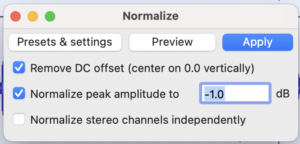
Effects -> Volume and Compression -> Normalize
These are the settings I’m currently using.
Once normalized:
File -> Export -> WAV -> 32 bit signed
Drag the file into Logic Pro.
You will need to flip the channels if you were recording with the microphone upside down.
On the track (not the stereo out track), right click on the pan knob and select Stereo Pan.
Command Click and it should turn orange. That reverses the channels.

Another thing I have been playing with currently is the Mastering Assistant. Verdict is still out if it’s awesome or not.